INSIDE THE CASES
- The case contains and protects the electronics of the computer or mobile device from damage.


- The motherboard is the main circuit board of the computer.
- A computer chip contains integrated circuits.

PROCESSOR
- Also called the central processing unit (CPU), interprets and carries out the basic instructions that operate a computer.
- Contain a control unit and an arithmetic logic unit (ALU)
- A multi-core processor is a single chip with two or more separate processor cores.

- The control unit is the component of the processor that directs and coordinates most of the operations in the computer.
- The arithmetic logic unit (ALU) performs arithmetic, comparison, and other operations
- A processor repeats a set of four basic operations, which consist of a machine cycle for every instructions.

- A processor chip generates heat that could cause the chip to malfunction or fail
- Require additional cooling
-Liquid cooling technology
-Cooling mats
CLOUD COMPUTING
- Home and business users choose cloud computing for a variety of reasons
-Cost Saving
-Scalability
-Space Saving
DATA REPRESENTATION
- Analog signals are continuous and vary in strength and quality.
- Digital signals are in one of two states: on or off
-Most computers are digital
-The binary system uses two unique digits (0 and 1)
- The circuitry in a computer or mobile device represents the on or the off states electronically by the presence or absence of an electronic charge.

- Eight bits grouped together as a unit are called a byte. A byte represents a single character in the computer or mobile device.

- Memory consists of electronic components that store instructions waiting to be executed by the processor, data needed by those instructions and the results of processing the data.
- Memory stores three basic categories of items:
-The operating system and other programs
-Applications
-Data being processed and the resulting information
- The system unit contains two types of memory:
-Volatile memory
-Loses its contents when power is turned off
-Nonvolatile memory
-Does not lose contents when power is removed
- Read-only memory (ROM) refers to memory chips storing permanent data and instructions.
- Flash memory can be erased electronically and rewritten.
- Access time is the amount of time it takes the processor to read from memory
ADAPTERS
- Adapter card enhances functions of a component of a desktop or server system unit and/or provides connections to peripherals.
-Sound card and graphics card
- Expansion slot is a socket on a desktop or server motherboard that can hold an adapter card.

- With Plug and Play, the computer automatically can recognize peripheral devices that has been installed.
POWER SUPPLY AND BATTERY
- Power supply or laptop AC adapter converts the wall outlet AC power into DC power

- Mobile computers and devices can run using either a power supply or batteries
- Batteries typically are rechargeable lithium-ion batteries

PENGEDITAN IMEJ (GIMP)
Tools Icon:

Paint tools:
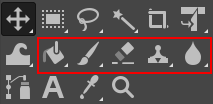
- Brush Tools (Pencil, Paintbrush, Airbrush)
- Bucket Fill
- Gradient
- Pencil
- Paintbrush
- Eraser
- Airbrush
Transform tools:
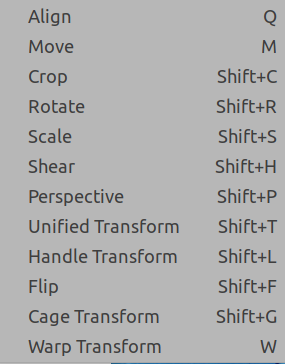
- Align
- Move
- Crop
- Rotate
- Scale
- Shear
- Perspective
- Flip
Text:
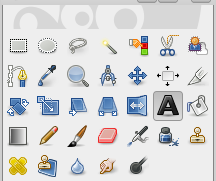
Text tool options:

Filters:
- Blur
- Enhance
- Distort
- Light and shadow
- Noise
- Artistic
- Edge-detect
- Generic
- Combine
- Rendering
- Animation

No comments:
Post a Comment